A note-taking system for visual follow-through
Capture anything. Turn it into what happens next.
Bring in a handwritten page, a sketch, a PDF, a web clip—or record a meeting. Turn handwriting into text you can search, clarify what matters, and review it later—without forcing every kind of thinking into the same shape.
No bot joins your call. OmniCanvas captures audio from your own device, with a consent reminder before you record so everyone can be told up front.
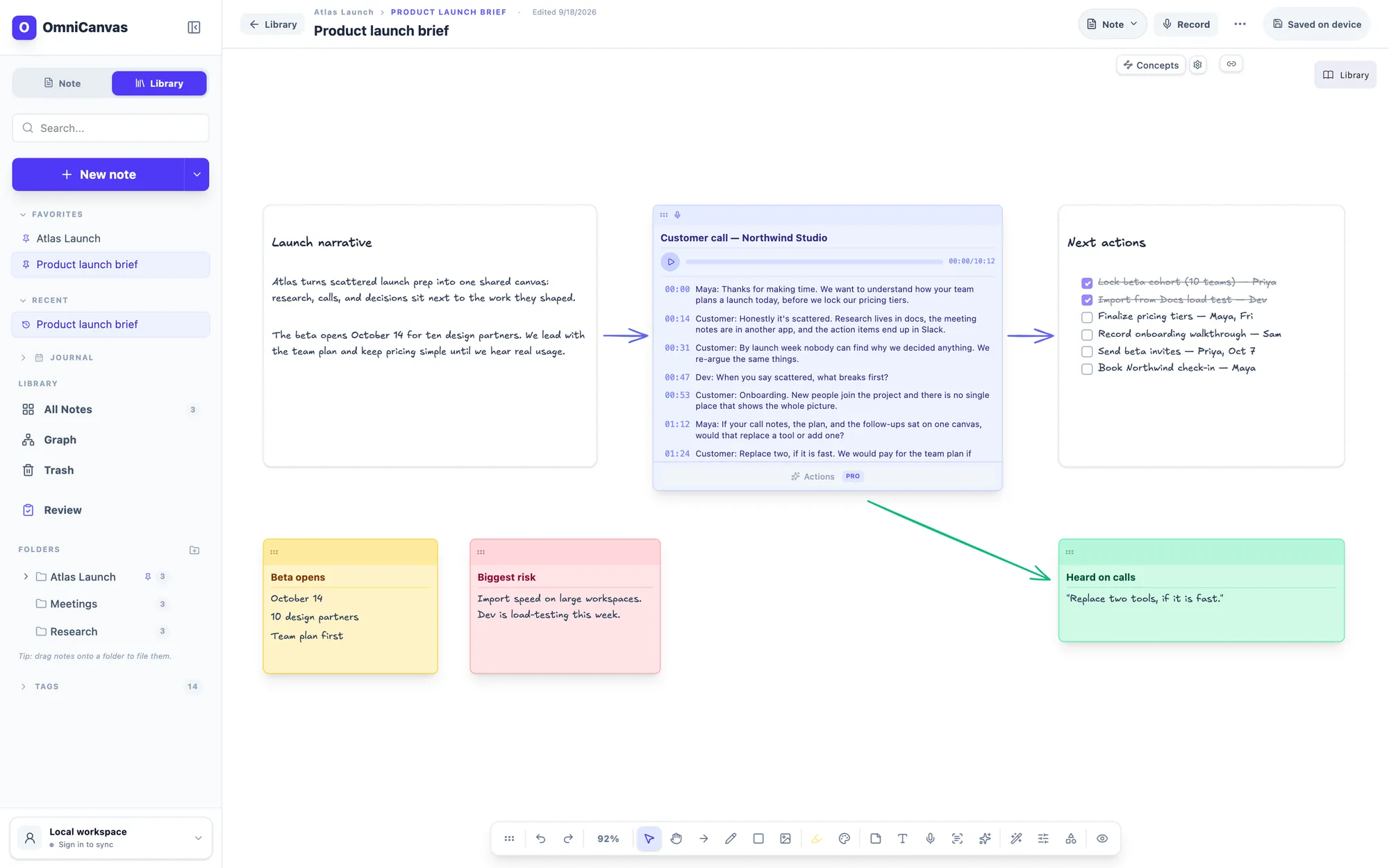
AI note taker · no bot in your call
Stay in the conversation. Your notes get filled in.
Jot a few words while you talk. When the call ends, each note comes back expanded from the transcript — decisions, owners, and next steps, linked to the moment they were said.
Atlas launch kickoff
Fictional meeting · prepared interactive preview
- Maya: The original May 8 launch is too aggressive because onboarding copy and the import test are still open.
- Jon: Engineering can finish the import test by Thursday. I recommend moving the beta to May 15 so we have a full week for fixes.
- Priya: May 15 works for customer success. I will recruit ten beta customers and send the list by Friday at 2:00 PM.
- Maya: Great. Decision made: beta launches May 15 with ten customers. Jon owns the import test by Thursday. Priya sends the customer list Friday at 2:00 PM.
- Jon: One open question is whether CSV exports need to ship with beta or can wait for general availability.
After · a workspace for follow-through
Three words each, typed while listening. Clarify them to see what the transcript fills in.
Your notes · typed during the call
- - launch date moving?
- - import test - Jon
- - CSV export??
That’s all you wrote. The transcript fills in the rest.
Open the Atlas sample in the real canvas. No account needed.
See OmniCanvas in action
Watch notes, images, sketches, web clips, and optional meeting capture come together in one visual workspace.
A system, not another app hunt
The app is only one part. The loop makes notes useful.
Capture in the shape that feels natural, add enough structure to understand it, decide what happens next, and review it before the context goes stale. AI helps with the work; it does not replace the system.
Capture
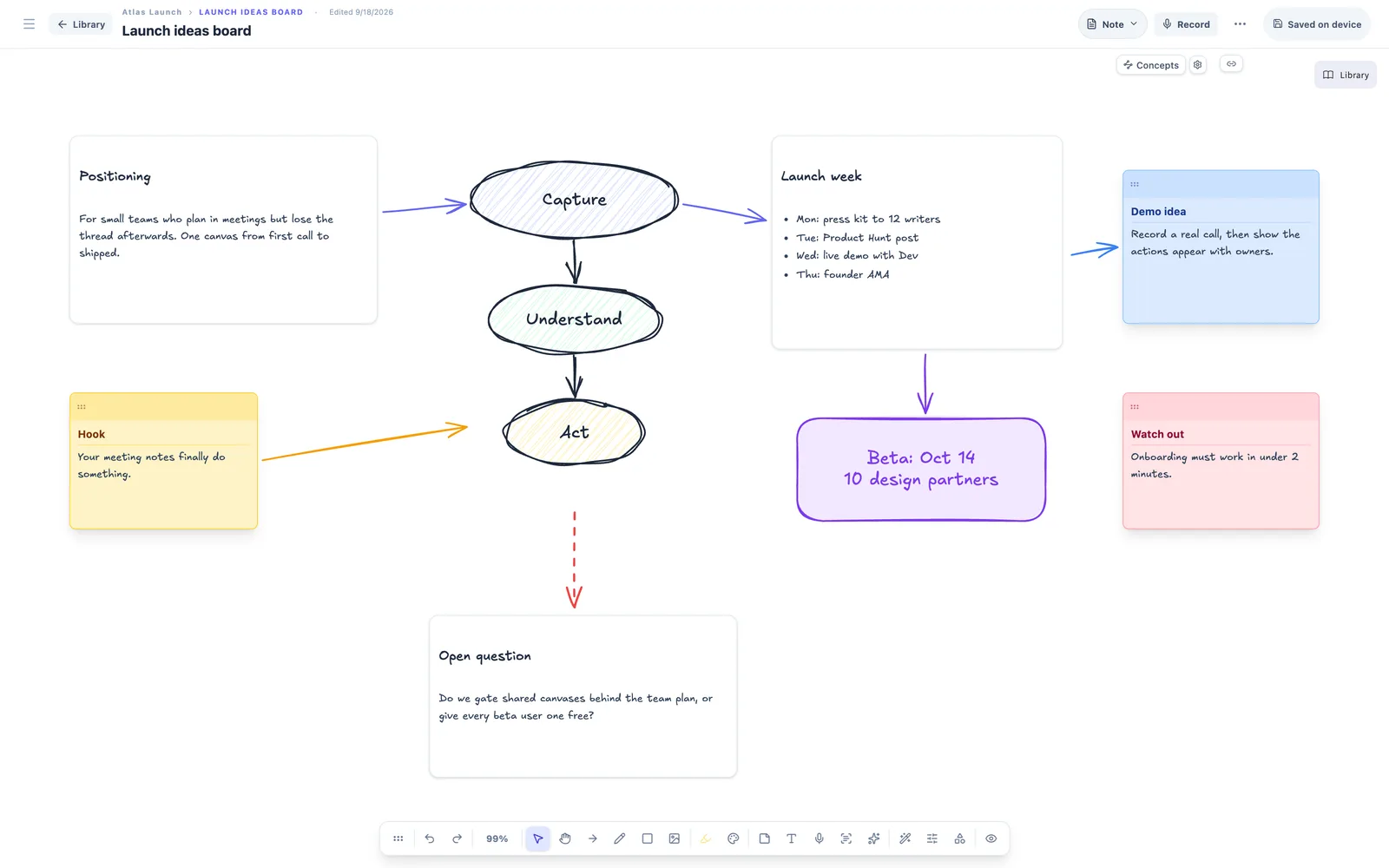
Start in the shape your thinking actually takes.
Write, draw, paste images, place sticky notes, and connect ideas without forcing them into a document outline first.
- Infinite canvas with rich text and drawing tools
- Templates for meetings, planning, and research
- Web clips, PDFs, images, and calendar-aware text
Connect
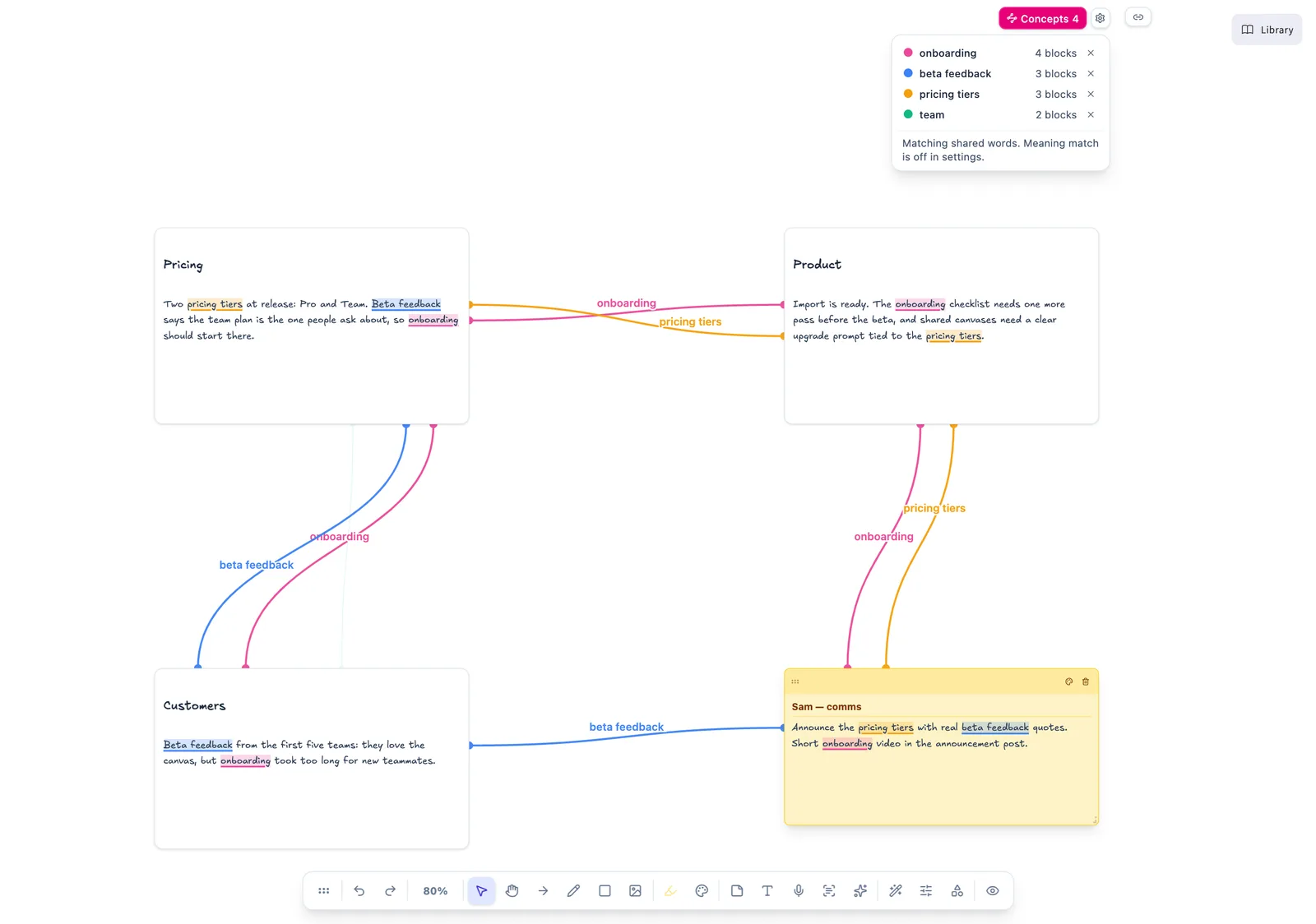
See how your ideas connect while you write.
Turn on Concepts and OmniCanvas highlights the ideas that recur across your text blocks and sticky notes, then draws a line between them in that concept's color. Download a small model once and it matches by meaning too, so “revenue” in one block links to “sales” in another.
- Lines update as you type, one color per concept
- Matches repeated lines, shared words, and related meanings
- Runs on your device; hide any concept with one click
Understand
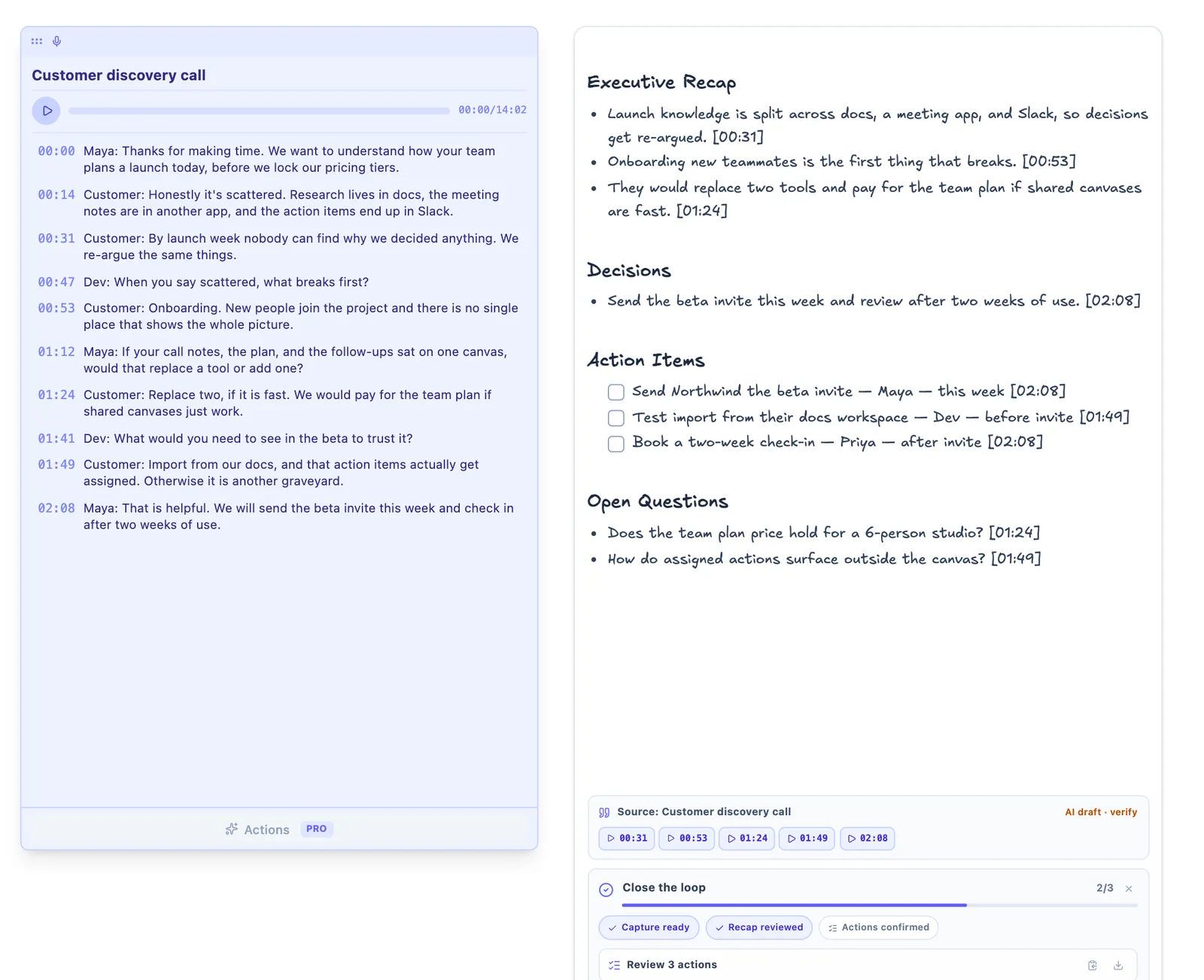
Turn a conversation into work you can act on.
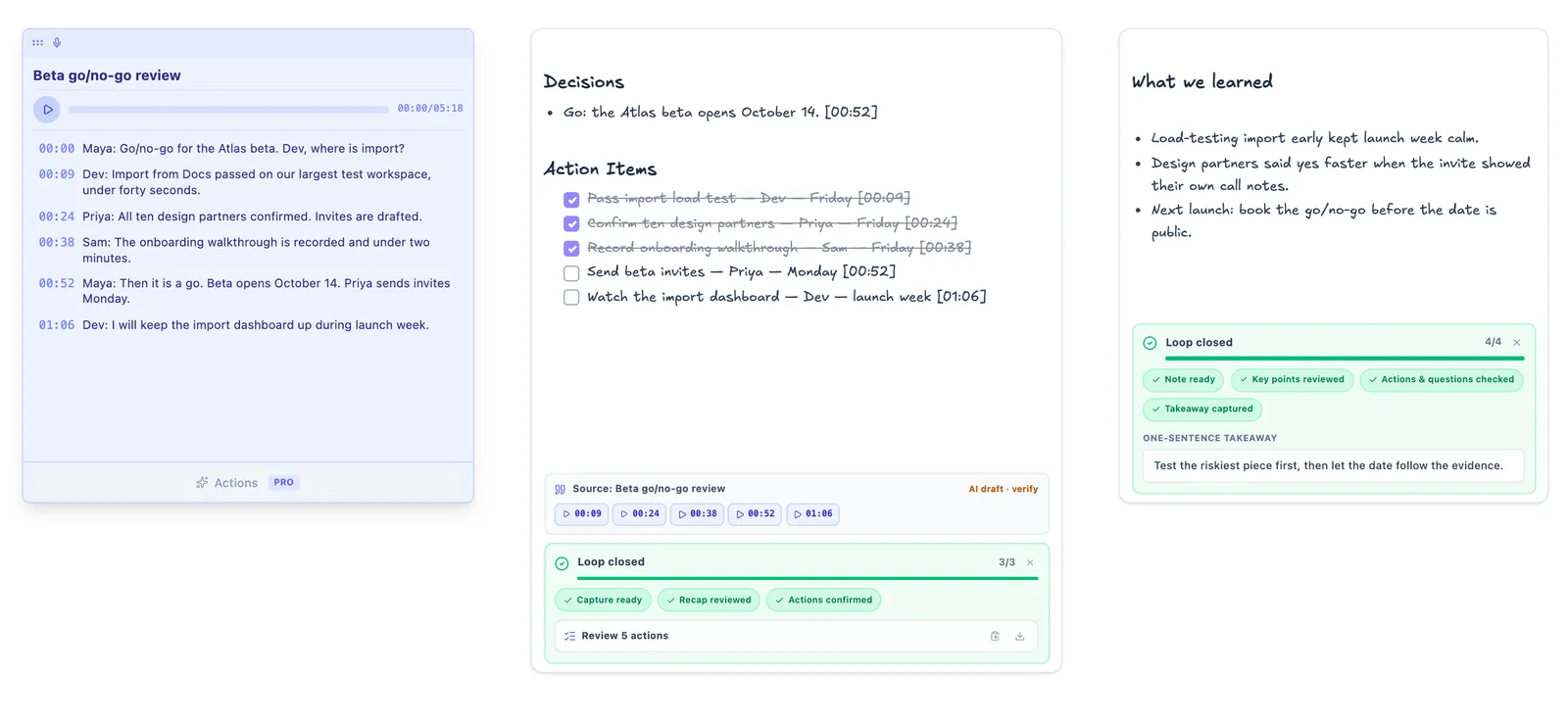
Record microphone and system audio without adding a bot to the call. Keep the transcript beside decisions, questions, and follow-ups on the same canvas.
- Live transcription and searchable recordings
- Structured recaps, decisions, and action items
- Transcript Q&A and reusable prompt workflows
Act
Close the loop before the note disappears into storage.
Confirm the actions, preserve open questions, and write one sentence that makes the note useful to future you. A weekly Review queue brings edited work back at the right time.
- Closeout prompts on ordinary notes and meeting captures
- Actionable Notes template for consistent structure
- Review, archive, and cleanup workflow built into the library
Retrieve
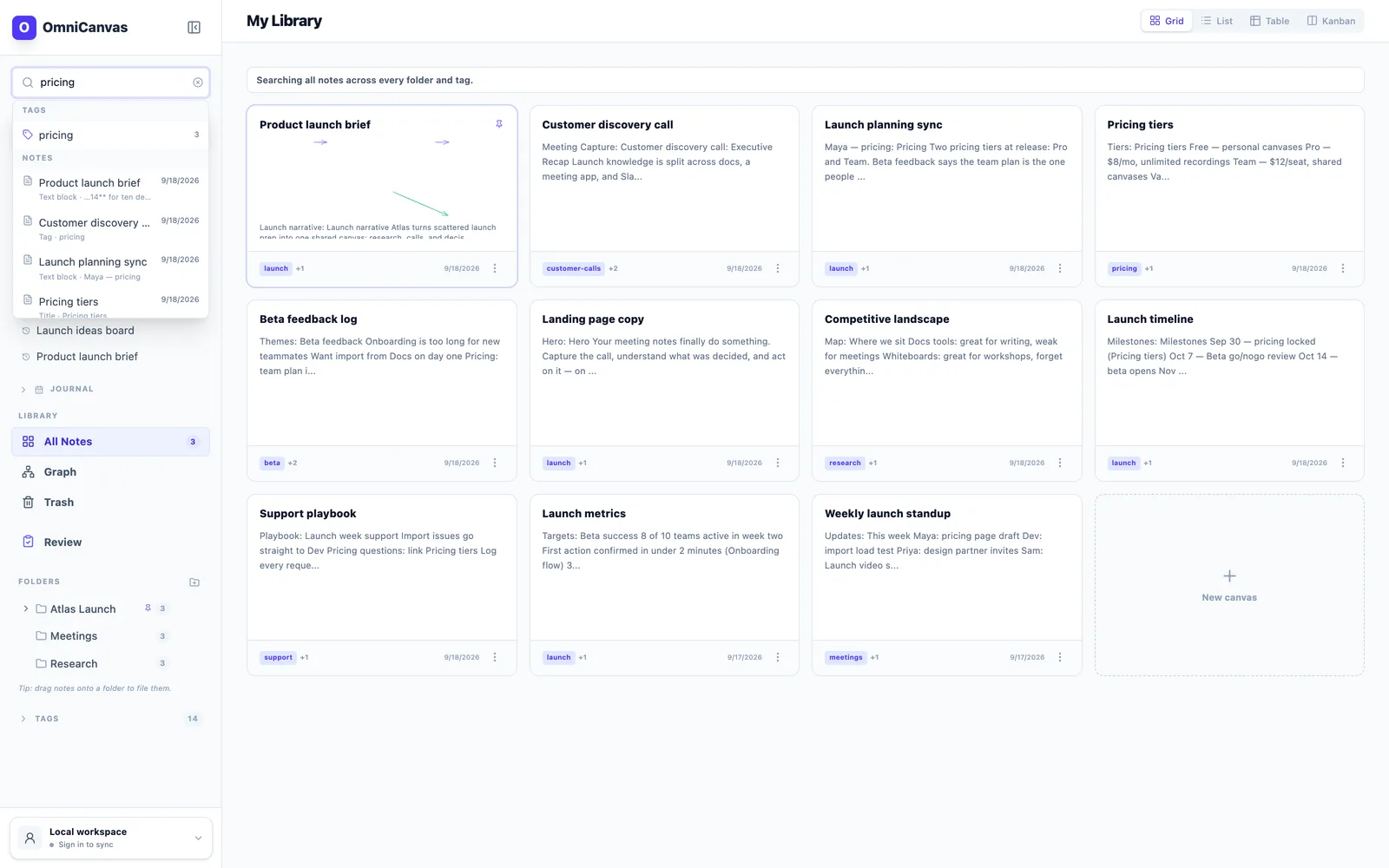
Find the thread long after the moment has passed.
Search exact words or related ideas, follow wiki-links, and move between grid, table, Kanban, and graph views as your library grows.
- Full-text and semantic search across notes
- Folders, tags, backlinks, and graph view
- Offline-first storage with sync and version history
Optional end-to-end encryption and complete exports.
Folders, tags, views, and links scale with your library.
Core capture and organization work without an AI workflow.
A companion, not a monopoly
Use the app that fits the moment. Keep one system for what matters.
No single note app has to win every moment. Use a native app for fast handwriting or one-off markup, then move durable project context into a repeatable capture, clarify, act, and review loop.
See the Apple Notes companion workflowOr compare iPad note workflowsCapture where it is fastest
Apple Notes, Goodnotes, Preview, paper, or any tool already at hand.
Clarify the useful context
Bring the relevant PDF, image, web clip, recording, or extracted text together around the idea.
Close the loop
Confirm actions and open questions, then write the one sentence future you needs.
Review and recover
Use a weekly queue to review, archive, or clean up—then retrieve through search, links, or the graph.
The core canvas, organization, and sync stay free. Paid plans fund ongoing transcription and AI compute.
One source, all the way to follow-through
See the full capture, clarify, act, and review loop before the account ask.
Capture the real source
Start with a meeting, note, PDF, web clip, image, or sketch. In the sample, a prepared 42-minute discovery call is already there.
Clarify what changed
Keep the context and evidence, then pull out the decision, key insights, open questions, and useful visual extracts.
Decide what happens next
Confirm action items and follow-up dates, then add a one-sentence takeaway that makes the note understandable later.
Review, archive, recover
Use the Review queue to close or archive the note, then retrieve it weeks later with its original context intact.
Project Ideas
Brainstorm new features for Q2 launch. Think about user onboarding flow...
Meeting Notes
Sync across all devices. Record audio memos. Clip web pages for reference.
Research Notes
Spatial computing helps memory retention by 40%. People remember WHERE they put things...
Todo
Add tag filtering. Fix dark mode toggle.
Draw, sketch, and organize on a real infinite canvas — right in your browser.
No sign-up required. Full drawing tools, templates, and more.
Try the interactive demoWhy it's different
We're a new, independent app in open beta. Here's what makes OmniCanvas different from the notes app you're using now.
Think the way your brain does
Ideas don't arrive in a straight line. Spread notes, sketches, and links across an infinite canvas and see how everything connects — at a glance.
One canvas for everything
Meeting transcripts, web clips, freehand drawings, and typed notes live side by side. No more scattering your thinking across five different apps.
Private by default
Local-first with optional cloud sync, and you can switch on end-to-end encryption per folder so not even OmniCanvas can read those notes.
Get updates on OmniCanvas
Join our newsletter for product updates, tips on spatial thinking, and early access to new features. No spam, unsubscribe anytime.
See the outcome now
Try a real workspace before you sign up.
Open a populated canvas in OmniCanvas and work in it right away. No account needed.
We never take a card to start your 30-day Pro trial, so the trial cannot quietly turn into a bill. Paying is a separate choice you make later, on purpose.
Create a free account. No payment form and no charge.
We send a reminder three days before the trial ends.
If you do nothing, your account returns to Free. Your notes stay yours.